In the previous article, we explored the legacy and new architecture of React Native, examining various components used in the new architecture. However, we did not delve deeply into the Fabric pipeline. Therefore, this article focuses on the Fabric Renderer and how React Native renders layouts.
What is Fabric Renderer
Fabric is React Native’s new rendering system that utilizes the JavaScript Interface (JSI) and the Yoga layout library to render the native UI on the target platform. Unlike the old rendering system, which relied on a large JSON dump and was asynchronous, the new Fabric system uses JSI to directly invoke C++ methods, allowing for synchronous updates to the native layout without any performance drop.
Fabric rendering have multiple phases:
- Render Phase: React executes the code and create a React Element tree which is then uses C++ to translate it to a React shadow tree.
- Commit Phase: Yoga library uses the shadow tree and decided the exact mathematical coordinates of the components and decides the layout.
- Mount Phase: Native side will render layout on the screen based on the information from the yoga tree
Let’s say you want to render a <View> with a <Text> component inside it as shown in the code example below:
export default function HomePage() {
  return (
    <View>
      <Text>Home Page</Text>
    </View>
  );
}
Render Phase
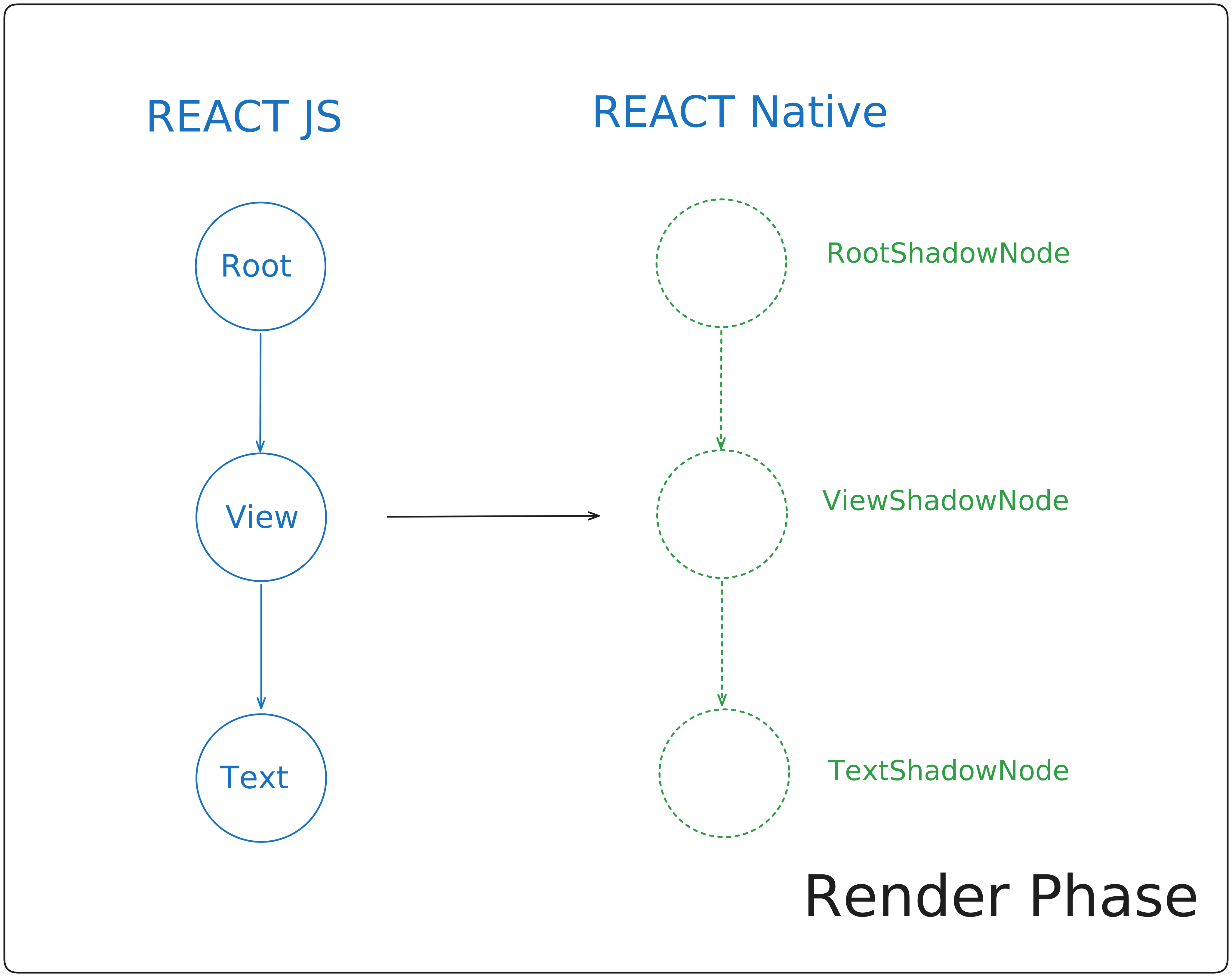
In the Render phase, React executes the JavaScript logic, and for every React component, it creates a React Element tree. This is standard React behavior, while at the same time, the Fabric renderer steps in.
The Fabric renderer utilizes C++ to synchronously generate a Shadow element for each React Host Component (such as View or Text) from the React Tree, thereby creating a Shadow Tree.
The React Renderer establishes the same relationships among Shadow Node elements as React does among its multiple React Nodes, resulting in the creation of the React Shadow Tree.
As this step is performed synchronously using the JSI, there is no serialization overhead.
Now, we have the blueprint of what to draw on the screen, but we don’t know the exact location or size of these individual nodes, hence we proceed to the commit phase.
Commit Phase
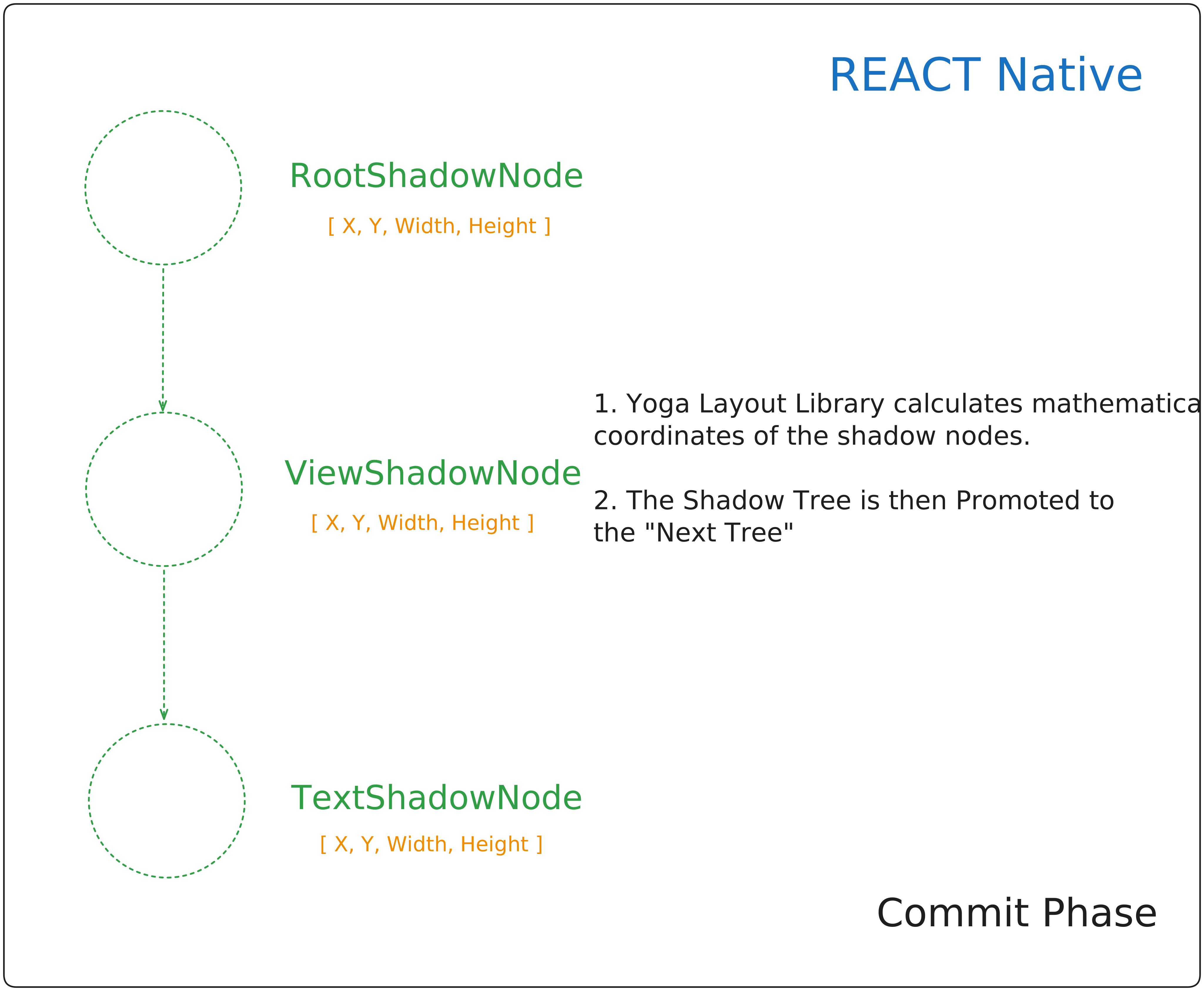
In the Commit Phase, the exact coordinates of the Shadow Nodes to be displayed on the screen are calculated. This involves two asynchronous operations: Layout Calculation and Tree Promotion.
- Layout Calculation: During this step, the Renderer calls the Yoga Layout Library to determine the precise size (height and width) and coordinates (X and Y) for each shadow node in the React Shadow Tree. This layout calculation is primarily handled in C++, except in certain situations where component size or location must be computed on the host platform. In such cases, the Yoga library triggers a native function to perform these calculations on the native layer.
- Tree Promotion: Once the layout math has been completed, then this React Shadow Tree is promoted as the official next tree, as it has all the information ready to be painted on the screen.
Both of the above operations are asynchronous in nature and executes on the background thread.
We have the blueprint, and we have the exact coordinates. The final step is to actually draw the native UI elements.
Mount Phase
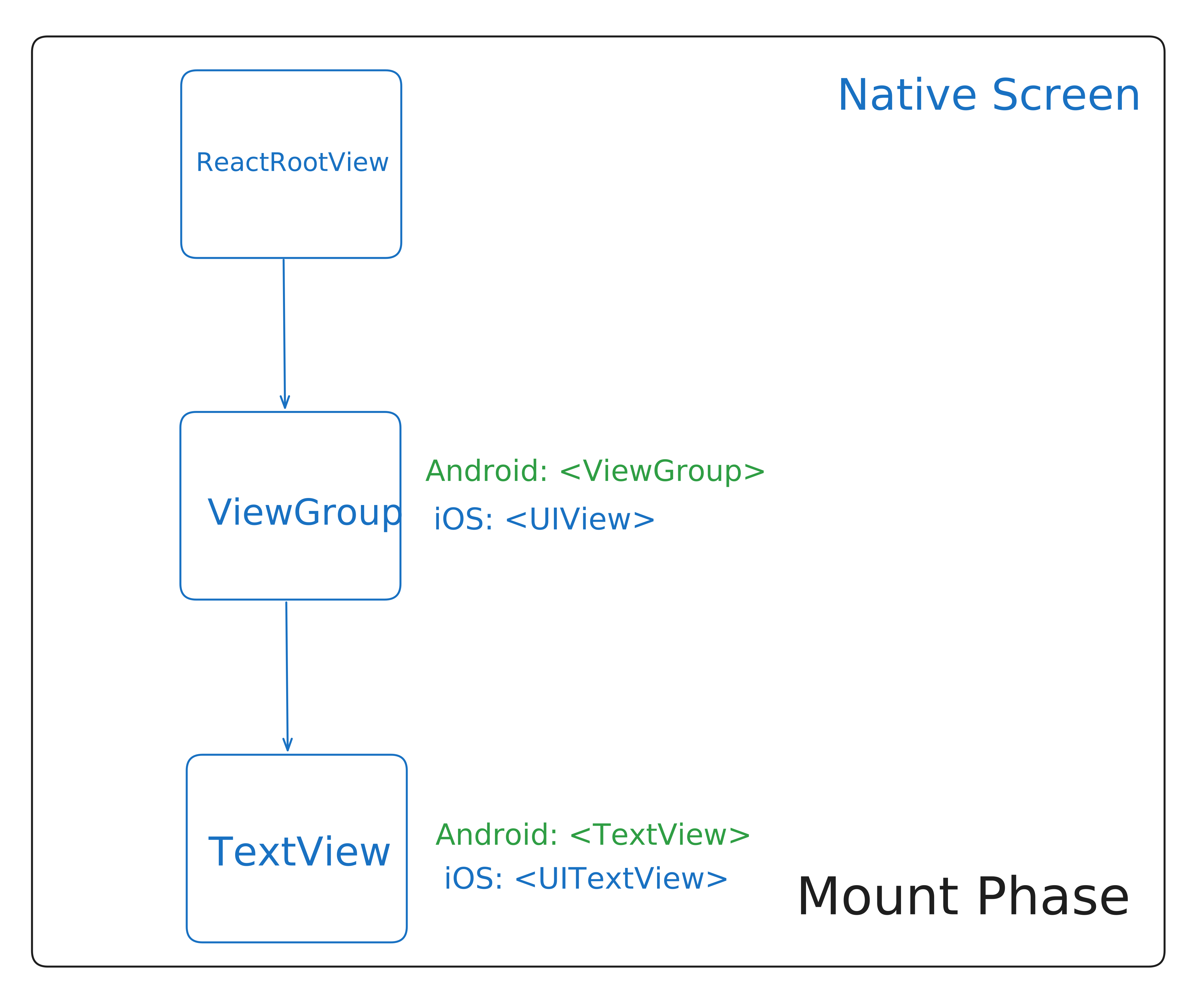
Mount phase, transforms the C++ React Shadow Tree into Host View Tree, hence rendering the actual components on the screen.
So the React code we originally had, which looked like this:
<View>
  <Text>HomePage</Text>
</View>
will be converted to its respective container called as Host View for each component and is then mounted on the screen.
Android
For Android, the View component will be converted to android.view.viewGroup and the Text component will be converted to android.widget.TextView and populates the text “HomePage” inside it.
iOS
For iOS, the View component will be converted to UIView and the Text component will be converted to UITextView and populates the text “HomePage” inside it with the help of NSLayoutManager.
Now the Mount Phase, itself consist of three different operations.
-
Tree Diffing: The C++ engine calculates the fundamental differences between the previously rendered tree and the new one. This process identifies minor changes, such as a background color alteration, to be applied to the UI, and then produces a list of necessary operations**.**
- Note: If it’s the initial render, the “previously rendered tree” is empty, so the resulting list will only include operations related to creating the views, setting properties, and so on.
-
Tree Promotion: The “next tree” officially becomes the “rendered tree”. This can be used for further comparison in tree diffing in case of any state updates.
-
View Mounting: The calculated changes are applied to the native host views. This happens synchronously on the main UI thread.
The operations are synchronously executed on UI thread. If the commit phase executes on background thread, the mounting phase is scheduled for the next “tick” of UI thread. On the other hand, if the commit phase executes on UI thread, mounting phase executes synchronously on the same thread.
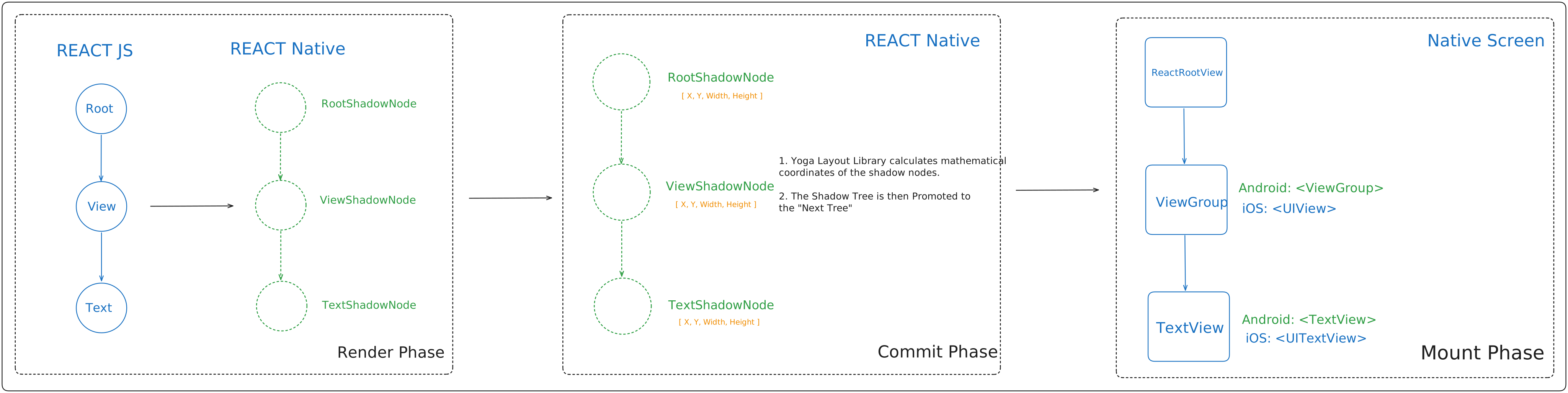
The above diagram shows the complete process of Fabric Rendering in React Native.
What Happens When State Changes?
Let’s say a user taps a button and changes a background color from red to yellow. How does Fabric handle this without rebuilding everything?
React enforces immutability. To ensure thread safety, the React Shadow Tree cannot be mutated directly. Instead, React creates a new tree. But doing this from scratch every time would be a performance nightmare.
To solve this, Fabric uses Structural Sharing. When your state updates, React only clones the specific nodes that were affected by the change, plus their direct path up to the root. All the other unchanged components are simply shared between the old tree and the new tree. This drastically reduces memory consumption and makes state updates incredibly fast.
Conclusion
And there you go! Now you understand how React Native’s new rendering system, “Fabric,” works. Since we already covered the old and new architecture, you now have a solid foundation in the fundamentals of React Native.