We all use web browsers every day. Whether it’s surfing social media, watching videos on YouTube, or doing a quick search, browsers have become such an essential part of our lives that we hardly notice them. However, behind this impressive technology is some great engineering, and that’s what we will explore today.
Before we dive in deeply, let’s first address the obvious question: What exactly is a web browser?
What is a Web Browser
A web browser is a software application used to access and retrieve information and resources from the World Wide Web, acting as an interface between the user and the internet. Simply put, a web browser is an application that lets a user visit websites.
Technically Speaking, A browser is a compiler and rendered which takes the raw text resources like HTML, CSS and JS and convert them into the visual representations on the screen.
There are some excellent web browsers available, such as Chrome, Edge, Firefox, Safari, and Brave.
Components of Web Browser
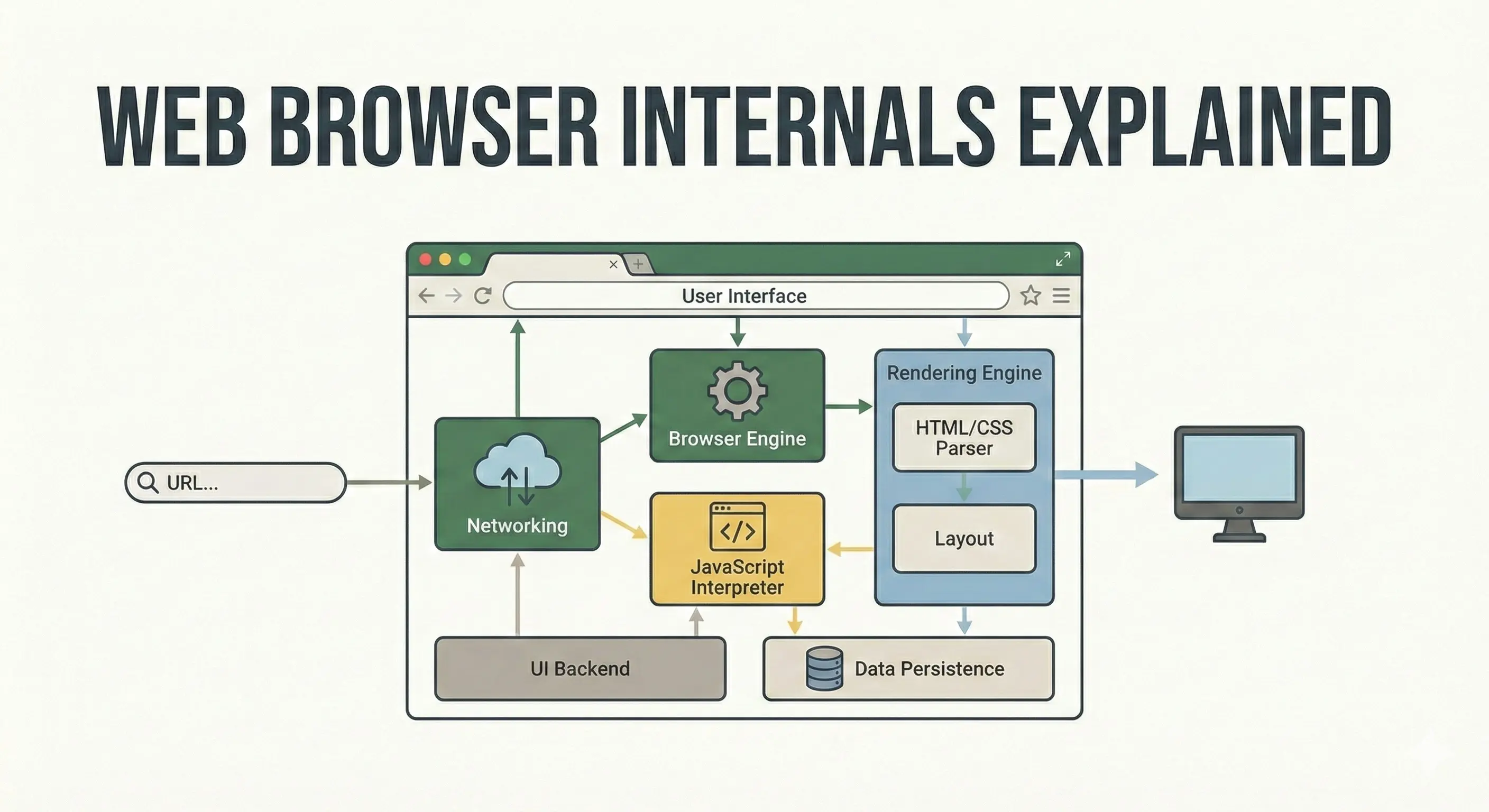
A web browser consists of multiple components such as:
- User Interface: This is the Graphical User Interface (GUI) part of the browser that the user can see and interact with. For example, in the Chrome browser, this includes the opening window with an address bar, bookmarks, shortcuts, and similar UI features that a user can see and interact with.
- Browser Engine: This part acts as the bridge between the User Interface (UI) and the Rendering Engine.
- Rendering Engine: This is the core of the browser. It transforms documents like HTML and CSS into their respective trees (DOM & CSSOM), which are used to display content on the webpage. In other words, it turns code into pixels. There are many rendering engines, such as Blink, Gecko, and Webkit.
- Networking: This component is very useful for performing network operations like DNS resolution and fetching resources such as HTML, CSS, and images from servers.
- JS Interpreter: This component runs the JavaScript code on our website. It is also known as the JavaScript engine which parses and executes the JavaScript code. Modern Engines also use JIT (Just In Time) Compilation to speed up this process. There are many popular JavaScript engines, such as V8, SpiderMonkey, and WebKit.
- UI Backend: This component interacts with the operating system and allows the display of UI components to users, such as windows and buttons in the browser’s interface.
- Disk Persistence: This Layer lets the browser store and retrieve data from the system’s storage with the operating system’s permission. This includes storage options like Cookies, LocalStorage, and SessionStorage.
How a WebPage is Rendered?
Now let’s go behind the scenes, of what happens when you enter a URL and access a website on the browser.
-
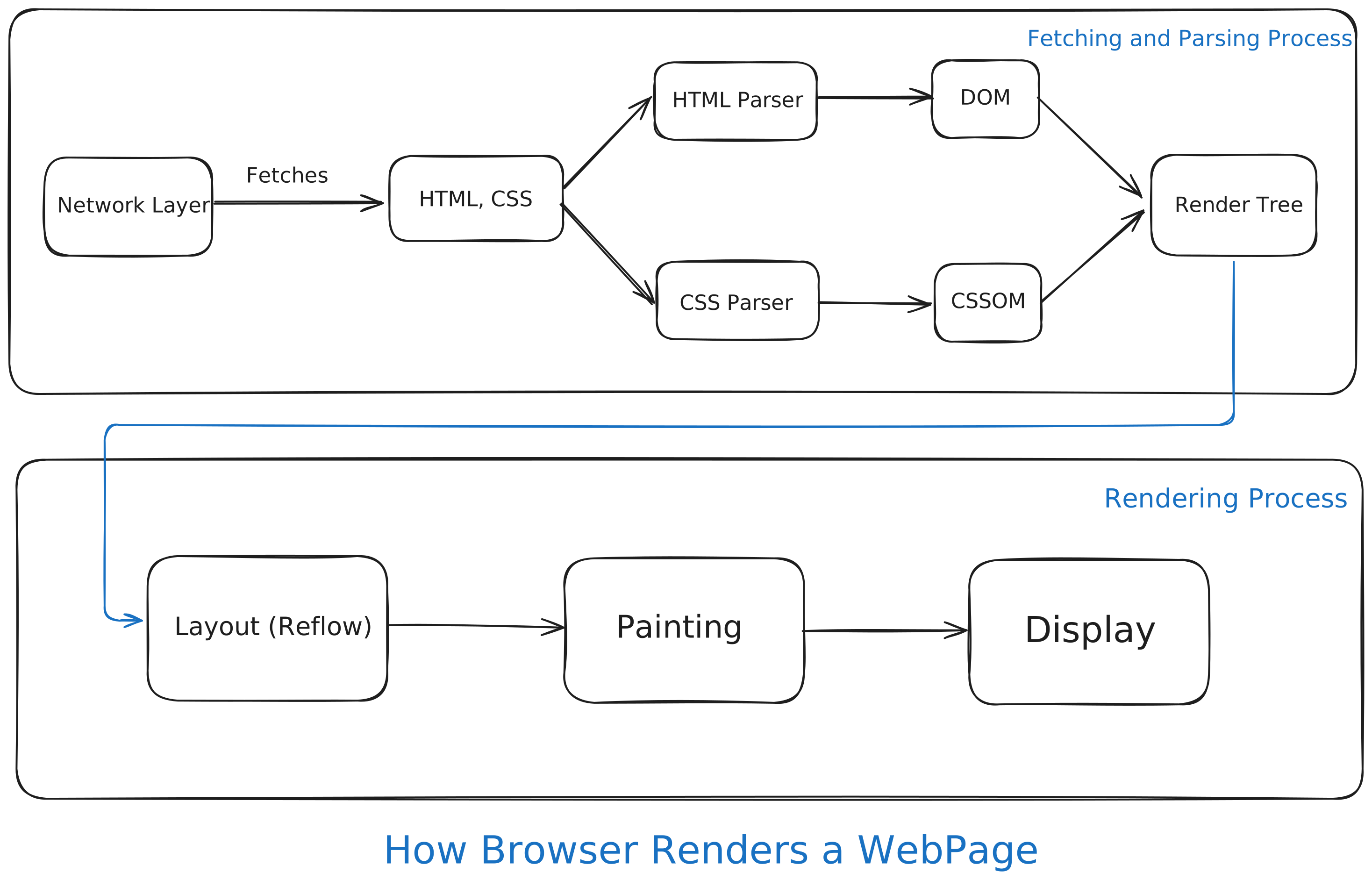
When you type a URL into the browser (e.g., thatsmanmeet.com), the Network Layer handles DNS resolution and sends a request to the server. It retrieves resources like HTML, CSS, and other elements such as images and fonts.
-
Once the HTML and CSS are fetched, these documents are sent to their respective Parsers. The Parser converts the raw text in these files into their respective Object Models.
- For HTML, the raw text like
<p>Hello</p>is broken into tokens and converted into objects known as Nodes. A Node is a single element or component on the webpage that represents an HTML element. These Nodes are arranged into a tree-like structure known as the Document Object Model (DOM). - For CSS, the raw text file is also broken into tokens and then parsed into another tree-like structure known as the CSS Object Model (CSSOM). This tree represents all the styles associated with the DOM Nodes. This step is important because the browser needs to decide which rule takes precedence among the browser default, user-defined stylesheets, or inline styles.
- For HTML, the raw text like
-
Once both the DOM and CSSOM trees are built, they are combined into a single structure called the Render Tree. This process is also known as frame construction in the Gecko Engine. This structure only includes the elements that will be visible on the webpage. Therefore, the Render Tree determines which elements will be displayed on the webpage.
- Elements with the
display:noneCSS property exist in the DOM but not in the Render Tree. - Elements with
visibility: hiddenexist in both the DOM and Render Tree, but they take up empty space. - Meta tags like
<head>,<meta>,<script>, etc., are also excluded from the Render Tree.
- Elements with the
-
Now that our parsing phase is complete, the browser will begin the rendering process.
-
At this point, the browser knows what to draw or render, thanks to the Render Tree, but it doesn’t know where each element should be placed on the page. For example, it doesn’t know whether the footer should be at the top or bottom of the page. This is where the next phase, Layout (Reflow), comes into play.
-
In the Layout (Reflow) phase, the browser calculates the exact position and size of every element in the Render Tree to be shown in the viewport. It also determines the exact pixel coordinates of every frame (box), taking into account padding, margins, borders, and other information. This is a computationally expensive process.
-
Now the browser knows where to draw everything. Next comes the Painting process, which converts the layout into pixels. The browser fills in the pixels with text colors, background images, images, shadows, borders, etc. This is usually done in multiple layers, similar to how Photoshop works.
-
Finally, we reach the Display phase, which includes another process known as Compositing. Since the browser paints in layers, it needs to flatten the layout to display it properly on the screen. Through the process of compositing, the image is finally displayed on the screen.
The JavaScript Interruption
You might have noticed that we didn’t mention JavaScript in the flow above. That is because strictly speaking, JavaScript is an interruption to the rendering process.
When the HTML Parser is happily building the DOM and encounters a <script> tag, everything stops.
The browser stops building the DOM because it doesn’t know what changes the JavaScript might make, such as adding, removing, or editing elements. So, the browser hands control over to the JavaScript Engine (like V8) to interpret and run the JavaScript code.
Only after the JavaScript finishes running does the Rendering Engine continue building the DOM. This is why it’s usually recommended to place <script> tags at the end of HTML documents, just before the closing body tag, so the DOM construction isn’t interrupted.
If a <script> tag is placed inside the <head> and the JavaScript file being loaded is quite large, the user would just see a blank white or black page, which would be a poor user experience.
Reflow vs Repaint
It is often confusing to understand the difference between Reflow and Repaint, but distinguishing between them is crucial for writing performant CSS.
- Reflow: Reflow happens when you change the layout or geometry of the page. The browser has to re-calculate the positions and dimensions of elements. Changing properties like
width,height,margin,position, or resizing the browser window. This is computationally expensive as single element causing reflow can cause browser to recalculate the layout for its parents and children as well.- Example: You hover over an element and it expands from 200px to 400px, pushing all other text down.
- Repaint: Repaint happens when you change the look of an element without changing its size or position. Changing properties like
color,background-color, orvisibility. This skips the Layout phase entirely and is much faster than a Reflow because the browser doesn’t need to do any geometry calculations.- Example: You hover over a button and its background color shifts from blue to dark blue.
Conclusion
A browser is far more than just a window to the internet. To the average user, the web feels like magic. But as developers, we now know it is actually a precise feat of engineering. You now understand exactly what happens under the hood from the moment a URL is typed to the millisecond the pixels appear on the screen.