Strings in JavaScript
In previous articles we did see what Strings are but now let’s discover Strings in great depth.
Definition
Section titled “Definition”In JavaScript, anything surrounded by single(’) or double(“) quotes is String data-type. In simple terms, String are sequences of characters surrounded by quotes.
const name = "Alex"
const friendName = 'Bob'
In the example above:
"Alex"is enclosed in double quotes'Bob'is enclosed in single quotes
Both are valid String data types.
Now, let’s explore a more sophisticated way to create a string using the String constructor:
const name = new String("Alex");In above example, we used JavaScript object String (remember type conversion?), to create a new String. Now let’s try to console log the above variable to see the output.
const name = new String("Alex");
console.log(name);
/*
String {'Alex'}
0: "A"
1: "l"
2: "e"
3: "x"
length: 4
[[Prototype]]: String
[[PrimitiveValue]]: "Alex"
*/
Hmmm, so above example gave us some interesting output if you observe it closely. Let’s dissect:
- The word
Alexis broken into multiple words “A”, “l”, “e”, “x”, which shows us thatStringis just sequence of characters, just like word is a collection of alphabets. - Every character (word) has a number before it. 0: “A”, 1: “l”, 2: “e”, 3: “x”, which represents the
indexor position of that character in theString. In most programming language the first item is usually at position or index0. - We have another property of
Stringcalled aslength. It tells us the number of characters in theString. In case of Alex, the length is 4. - In
Prototypeif we expand it from our browser’s console, we have a huge list of functions (kinda like, operations) that we can perform on thisString. - Finally, the
PrimitiveValueis our actual originalStringwhich in our case isAlex.
Hence, You can see there’s a lot of things going behind the scenes, when we declare Strings. Now based on our above examples, we will dive deep into every aspect of the String object.
What’s is Index?
Section titled “What’s is Index?”So, In above example, if you recall, we learned that each character in the String holds a position and that position is called as index of that character.
Let’s see this code snippet:
const name = "Alex";
console.log(name[0]) // Outputs A
console.log(name[1]) // Outputs l
console.log(name[2]) // Outputs e
console.log(name[3]) // Outputs x
In above code snippet, we can clearly see that we can print every single character of a String by using a Square Brackets [] with an index inside those square brackets.
console.log(variable_name[index of character])
Here:
- variable_name represents the variable which is of type
String - Square Brackets tells JavaScript that we want to access a character at specific
index. - index is the position of the character inside the
String.
Wait! You might be wondering now; “Hmmm, fine so index represent position of each letter in a word, but why the first one is 0? Shouldn’t this be 1 instead?”. Yes, you are completely right to wonder about this.
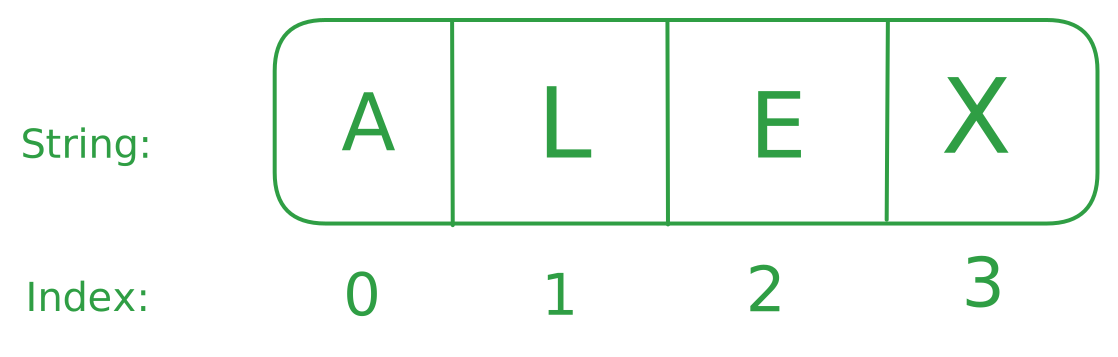
We humans count things from 1 but in case of computers, the counting starts from 0. See the example Below:
Counting: Humans vs Computers
Item:     🍫    🍫   🍫
Humans:    1    2    3
Computer:  0    1    2
Above example clearly shows a small difference on how we count vs how a computer would count and this explains why first word in Alex i.e “A” is at index 0. Refer to the image below.
Now you have understood, how the indexing works in String and how can we access specific element from a String.
String Methods
Section titled “String Methods”Do you remember, in original example we had a Prototype in our console output? I very briefly touched on it and said it includes multiple functions to perform different operations on String data type.
Prototype allows specific data types to perform specific operations. So, A Prototype of Number would provide different operations than one of the String. This is an advanced concept and we will discuss it more in upcoming articles.
Now let’s focused on String Methods. So, Prototype exposes various functions that allow us to perform multiple operations on String. Let’s discuss a few:
1. toUpperCase()
Section titled “1. toUpperCase()”toUpperCase() method allows us to convert a String from lowercase to uppercase.
const name = "Alex";
console.log(name.toUpperCase()) // Outputs ALEX
In above example, the name “Alex” will become “ALEX”. In other words, this function will convert every single small or lowercase letter in a String to Capital or uppercase letter, hence making entire String uppercased.
2. toLowerCase()
Section titled “2. toLowerCase()”toLowerCase() method allows us to convert a String from uppercase to lowercase. It is a reverse of toUpperCase() method.
const name = "ALEX";
console.log(name.toLowerCase()) // Outputs alex
In above example, the name “ALEX” will become “alex”. In other words, this function will convert every single capital or uppercase letter in a String to small or lowercase letter, hence making entire String lowercased.
3. ChatAt()
Section titled “3. ChatAt()”This method tells you which character is currently on which index. Basically you will pass the index in the method and in return you will get the character.
const name = "Alex";
console.log(name.charAt(1)); // Outputs l
In above example, index 1 was passed and it returns l as output. If you look closely, by starting with index 0, the l comes at position 1.
Hence, in simpler terms, this method takes in position as a Number and returns the character at that specific position.
4. indexOf()
Section titled “4. indexOf()”This method tells you the current index of a passed character. This method is reverse of the charAt() method.
const name = "Alex";
console.log(name.indexOf("l")); // Outputs 1
In above example, character l was passed and it returns 1 as output. If you look closely, by starting with index 0, the l comes at position 1.
Hence, in simpler terms, this method takes in character as a String and returns the index of that character.
NOTE: IF the character doesn’t exist in the String, it will return -1.
5. slice()
Section titled “5. slice()”This methods allow you to cut a piece of the String out, based on index positions. THink of it like using a scissors to cut the part of paper with text on it.
const quote = "Believe you can and you're halfway there"
console.log(quote.slice(0,19)) // Outputs: Believe you can and
From above example we can learn a few points.
index 0is the start position of theString.index 19is the end position of theString.- Output would be the
Stringbefore theend index. - The
end indexis NOT INCLUDED.
const name = "Alexander";
console.log(name.slice(4)); // Outputs "ander"
You can even cut the string from the middle. If you only give it Start index, then it will return everything from that index.
6. trim()
Section titled “6. trim()”Ever copied some text with weird extra spaces at the beginning or end? trim() to the rescue!
const messy = "   Hello World!   ";
console.log(messy.trim()); // Outputs "Hello World!"
This method removes all the whitespace from the start and end, but not from the middle.
7. includes()
Section titled “7. includes()”This method allows you to search whether a certain character or String is present in the main String or not. In simpler terms, it allows you to search through the string.
const shopping = "I am thinking to buy apples, mangoes and avocado.";
console.log(shopping.includes("apples")) // outputs true
In above apple, we searched for “apples”, and as the term is present in the String, the function will return true.
Hence, these were some string methods. However there are a lot of methods and learning all of them is not advisable. Whenever you need to find some method for String, you can check this MDN Resource.
Combining multiple String into one final String is known as String Concatenation.
Let’s see this example:
const firstName = "Alex"
const lastName = "Owens"
const profession = "programmer"
console.log(firstName + " " + lastName + " is a " + profession)
In above example, we can see that we used plus “+” operator to combine multiple strings, however there’s one small issue (better word: annoyance) here; Just to print a simple sentence, we have to add so many + operators here. Right?
You might argue that well it was only few plus operators, not a big deal! And you’re right, in fact it’s completely normal to use double and single quotes but what would happen if there’s a lot of variables and the String you want to create is too complex?
Well, what if I told you that there’s a better way of using Strings? A way that makes out lives so much easier when working with Strings. Introducing Template Literals!
Template Literals
Section titled “Template Literals”Template Literals also known as String Literals is a way of creating complex strings with lot of placeholder values with the help of backticks (``).
In simpler terms, Template Literals use backticks (``) instead of quotes ("") to define a String.
What’s the benefit you ask? Well let’s take our previous example.
const firstName = "Alex"
const lastName = "Owens"
const profession = "programmer"
console.log(firstName + " " + lastName + " is a " + profession) // without literals
console.log(`${firstName} ${lastName} is a ${profession}.`) // Template Literals.
In above example, you can observe that we create a simple string with backticks and wrote out string naturally where variables are known with dollar sign followed by curly braces ${variable_name}. Isn’t this cool? No more plus signs, weird spaces and just one line for even complex Strings?
And there’s more! With Template Literals, you can also create multi-line strings without any weird symbols like \n:
const poem = `
Roses are red,
Violets are blue,
JavaScript is fun,
And so are you!`;
console.log(poem);
Hence, Template Literals allow you to write String in a much simpler and easier way and I would recommend you to use Template Literals as default for most things.
Big Gotcha : Strings are Immutable
Section titled “Big Gotcha : Strings are Immutable”Strings are Immutable in JavaScript or in simpler words, once a String is created it cannot be changed or cannot be modified!
What? You might be thinking, we just learned String Methods and methods like toUpperCase() for example, did output an uppercase string. How come it is immutable? Output did change!
Well, you are right! But here’s a secret; behind the scene, JavaScript created a new String and returned the new String with that modification.
Example:
const name = `Alex`; // declared Original String
const capitalName = name.toUpperCase(); // we capitalize entire String
console.log(name); // Outputs: Alex
console.log(capitalName) // Outputs: ALEX
In above example, we can see that original string name was not modified, it was in fact the new String with name capitalName that was modified.
But why create new variable then? Still not convinced? I got you!
const name = `Alex`; // declared Original String
console.log(name.toUpperCase()) // Outputs: ALEX
console.log(name); // Outputs: Alex
In above example, we didn’t create any variable but the original variable name even after uppercase operation in last line still returned original String.
This concludes that String are immutable, the methods will always return a new string.
🧵 Wrapping It Up
Section titled “🧵 Wrapping It Up”Strings in JavaScript are more than just text ; they’re powerful, flexible, and packed with useful features. From understanding index positions to using built-in methods like toUpperCase() and slice(), and writing cleaner code with template literals, you’ve now got a solid grasp of how to work with them. Just remember: strings are immutable, so any changes you make return a new string. Keep exploring and practicing, because mastering strings opens the door to writing cleaner and smarter code!